Skip to content

Behind every property, a decision. Make it with numbers.

Real estate investment analysis for U.S. investors and realtors.

Find properties behind municipal cases and permits in covered ZIPs, then analyze cash flow, STR and a -10% stress scenario in dollars. Investigate the address, not just the area.

  • Start on the Free plan
  • English and Spanish · Web, iOS and Android
  • PDF with a property visit guide

Profile

Investor: Organize your capital, explore strategies and compare opportunities with assumptions you can review.

Realtor: Guide your clients with analyses, scenarios and reports. Use the commission and branding tools your plan includes.

The platform supports your analysis. The final decision is always yours.

RentalRenovation flipBRRRRResaleShort-term rental

> analyze --sample miami --strategy rental

Sample property

1 Sample Market St, Miami, FL 33155

Neutral profileSample dataAndroid app
Score
51/100
Cash flow / mo
$54
Cash-on-cash
0.5%
Cap rate
6.5%
Preliminary score · adjusted51
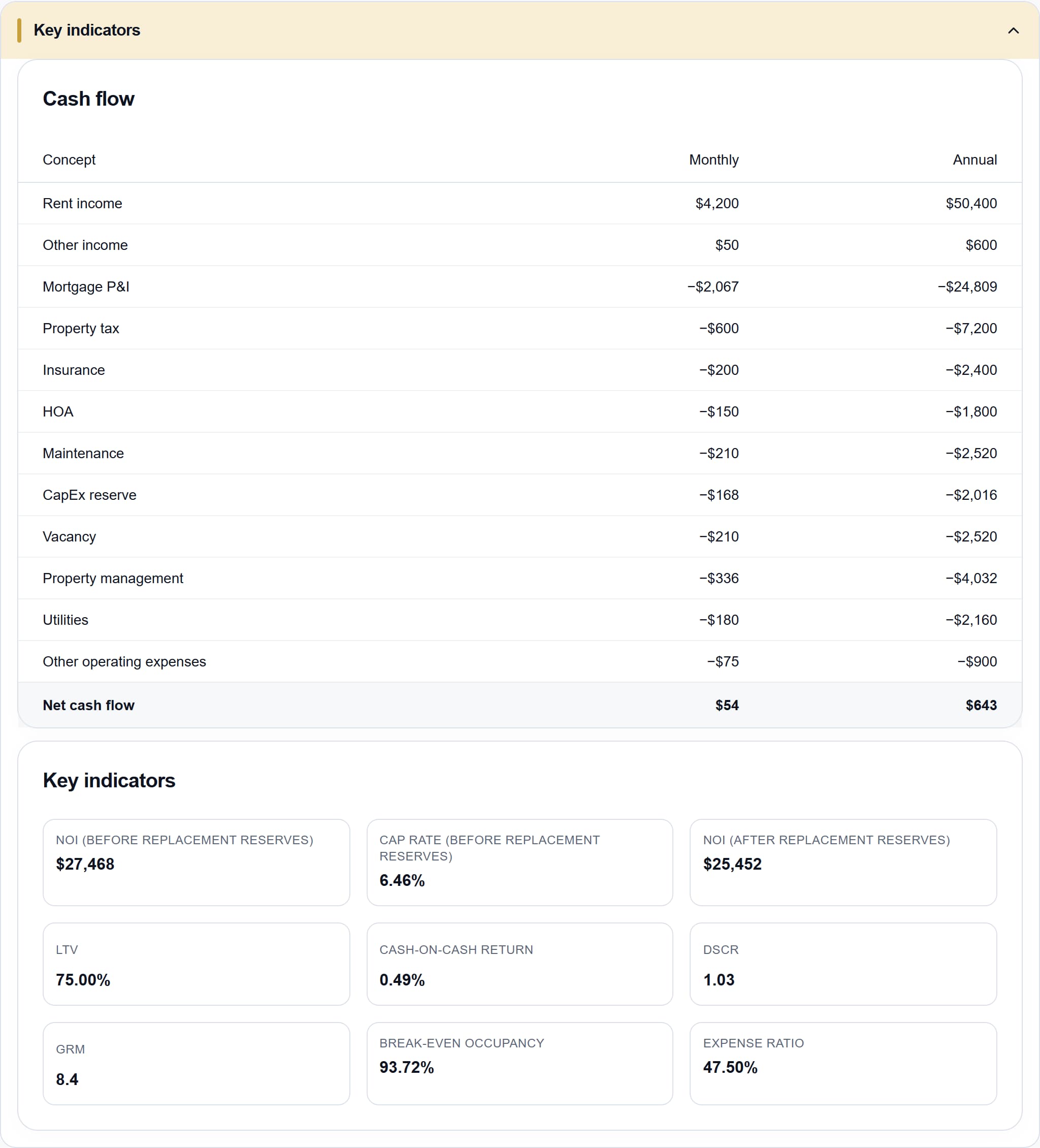
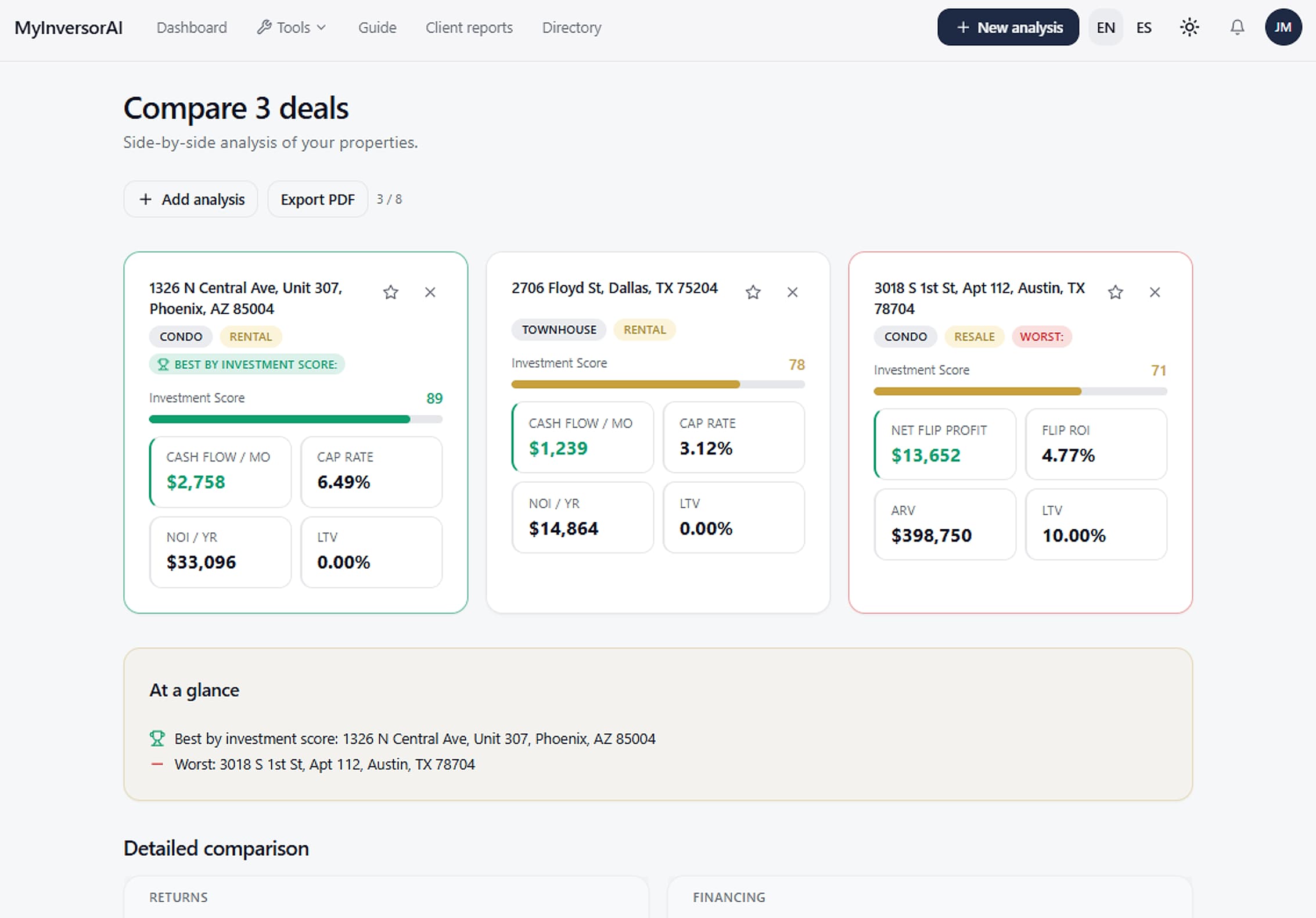
Cash flow table and key indicators for the Miami sample propertyCash flow table and key indicators for the Miami sample propertyWeb comparison of the three sample properties in Phoenix, Dallas and Austin

Product screenshot · Sample data, not information about this area.

RentalRenovation flipBRRRRResaleShort-term rentalConservative · Neutral · Aggressive profiles

Up to five strategies, depending on the property and the available data.

Modules · From property to decision

Less guesswork. More perspective.

From a property to a strategy. Explore the product screens and see how your next decision comes together.

  • Mod. 01 ▸ OpenFree · profiles and matrix on paid plans

    Property analysis

    Explained cash flow, ROI, DSCR and score. Up to five strategies, with credit and financing.

  • Mod. 02 ▸ OpenFree · filters on paid plans

    ZipFinder

    Discover addresses behind municipal cases and permits. Follow covered ZIPs for the Monday Radar.

  • Mod. 03 ▸ OpenFree

    Pulse and surroundings

    Market context by ZIP and area indicators, only when a compatible source provides data.

  • Mod. 04 ▸ OpenPaid plans

    Budget and Investment Kit

    Explore what you could buy and build a mix of same-area properties within your capital.

  • Mod. 05 ▸ OpenPaid plans

    Blackboard and private inbox

    Post and discover opportunities, analyze them and talk privately with other members.

  • Mod. 06 ▸ OpenPDF free · branding on Realtor plans

    Reports, commissions and Directory

    The PDF with a visit guide and Directory browsing, on every plan. Branded reports and commission tools, on Realtor plans.

~/myinversorai/modules/01-analysis/cash-flow-and-key-indicators · 1/4

Understand the deal

The numbers, in context.

Review cash flow, financing and strategies. Adjust your assumptions, compare scenarios and understand what drives the score.

  • Metrics with explanations
  • Scenarios for your risk profile
  • Comparisons and favorites
Advanced tools depend on your plan

Functions

Analysis, STR and stress scenario

Explained cash flow, ROI, DSCR and scores. Includes STR with your own assumptions; automatic STR data and the -10% dollar stress table depend on your plan and available data.

Valuation and comparables

An estimated range and available evidence to assess the price. A reference, not a professional appraisal.

Credit and financing

Model indicative rates and payments using credit, down payment and assumptions. Not a loan offer or approval.

History, favorites and comparison

Revisit analyses, compare properties and review your Blackboard posts when your plan allows.
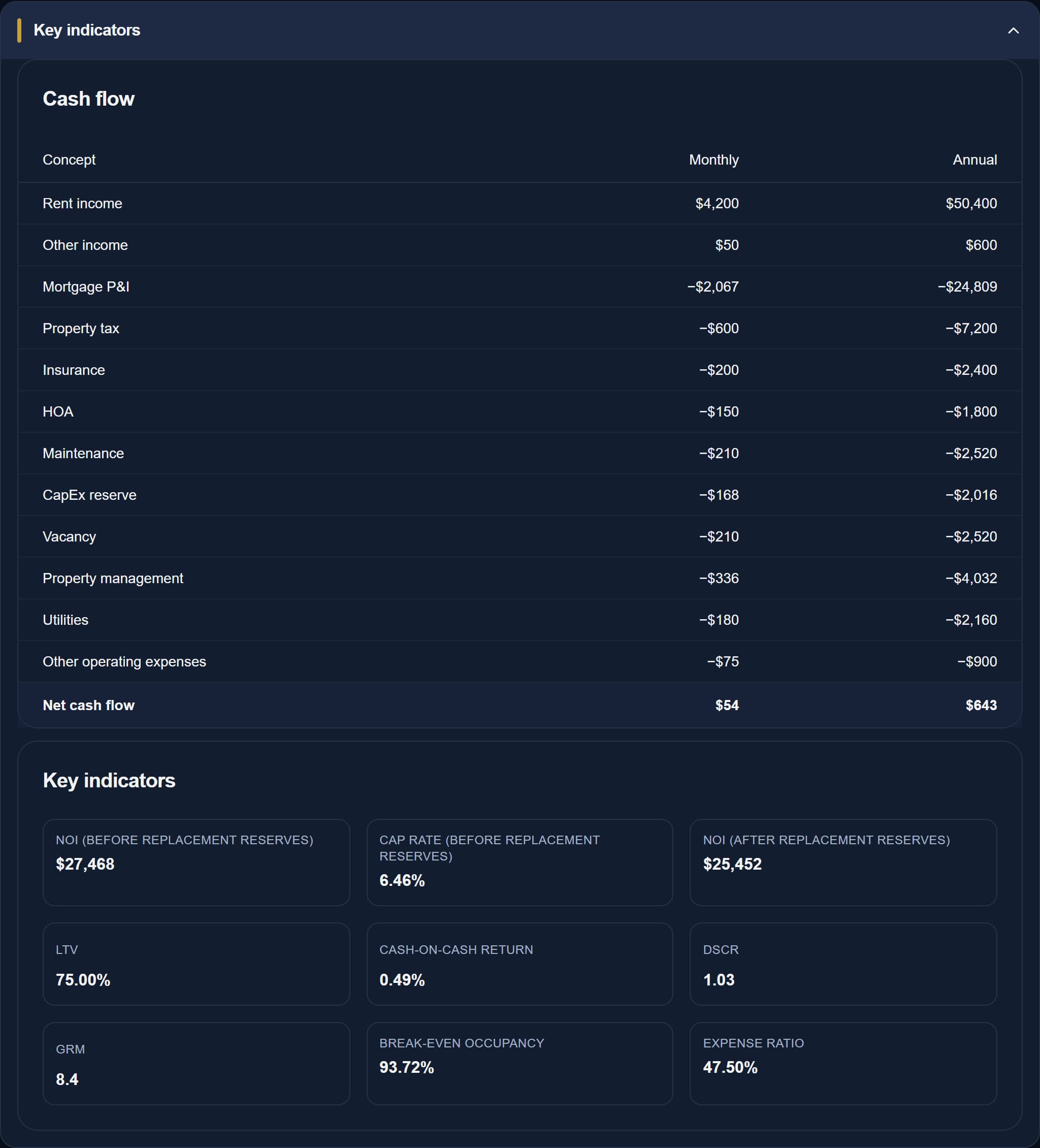
Cash flow table and key indicators of a sample analysisCash flow table and key indicators of a sample analysis
Cash flow and key indicatorsWeb · Product screenshot · Sample data

Cash flow and key indicators Web · Product screenshot · Sample data

1/4

ZipFinder

Go from a ZIP to the property worth investigating.

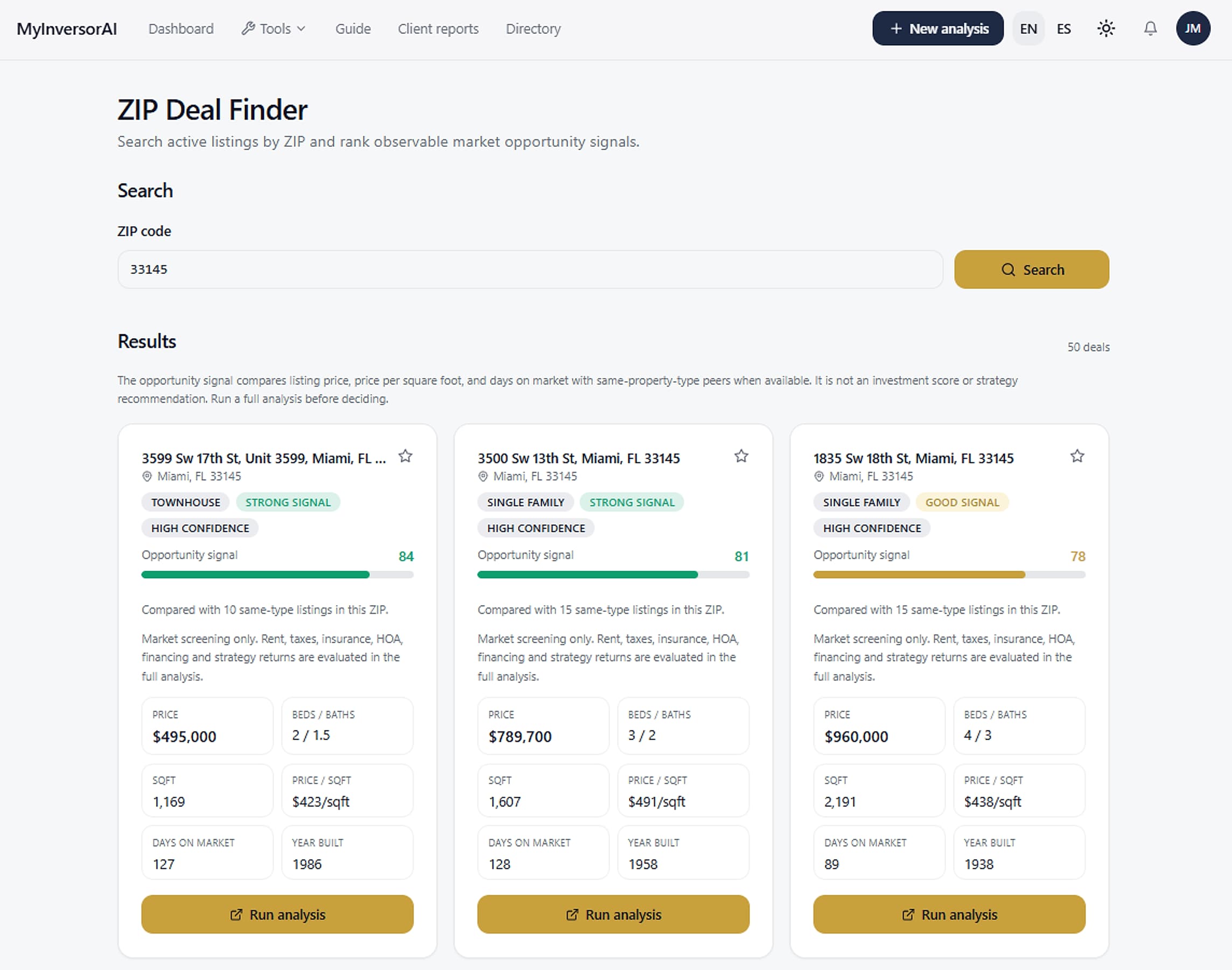
See address-level public records of unsafe structures, code violations, demolition, recertification and permits where covered. Paid plans unlock exact addresses and property X-ray matches alongside active listings. A public record is not proof of a sale or a bargain.

Free: masked street numbers · paid plans: exact addresses, X-ray, filters and similar properties

Functions

ZipFinder and municipal property X-ray

Discover properties behind municipal cases and permits where covered. Free hides street numbers; paid plans show exact addresses and property matches. Follow up to five ZIPs for the Monday Radar.

ZipFinder filters and sorting

Filter the returned listings by price, days on market, bedrooms or area; sort by score, price, size and more without another search.

Similar properties

Up to two same-ZIP, same-type alternatives within ±20% of price, when matching listings exist. Additional searches only on request.

ZipFinder search results on the web
ZipFinder results on the webEarlier version · Web · Earlier version; current screens may differ.

Know the area

Pulse and surroundings

Check the market context and the area indicators whenever compatible data exists.

Free

Functions

Pulse

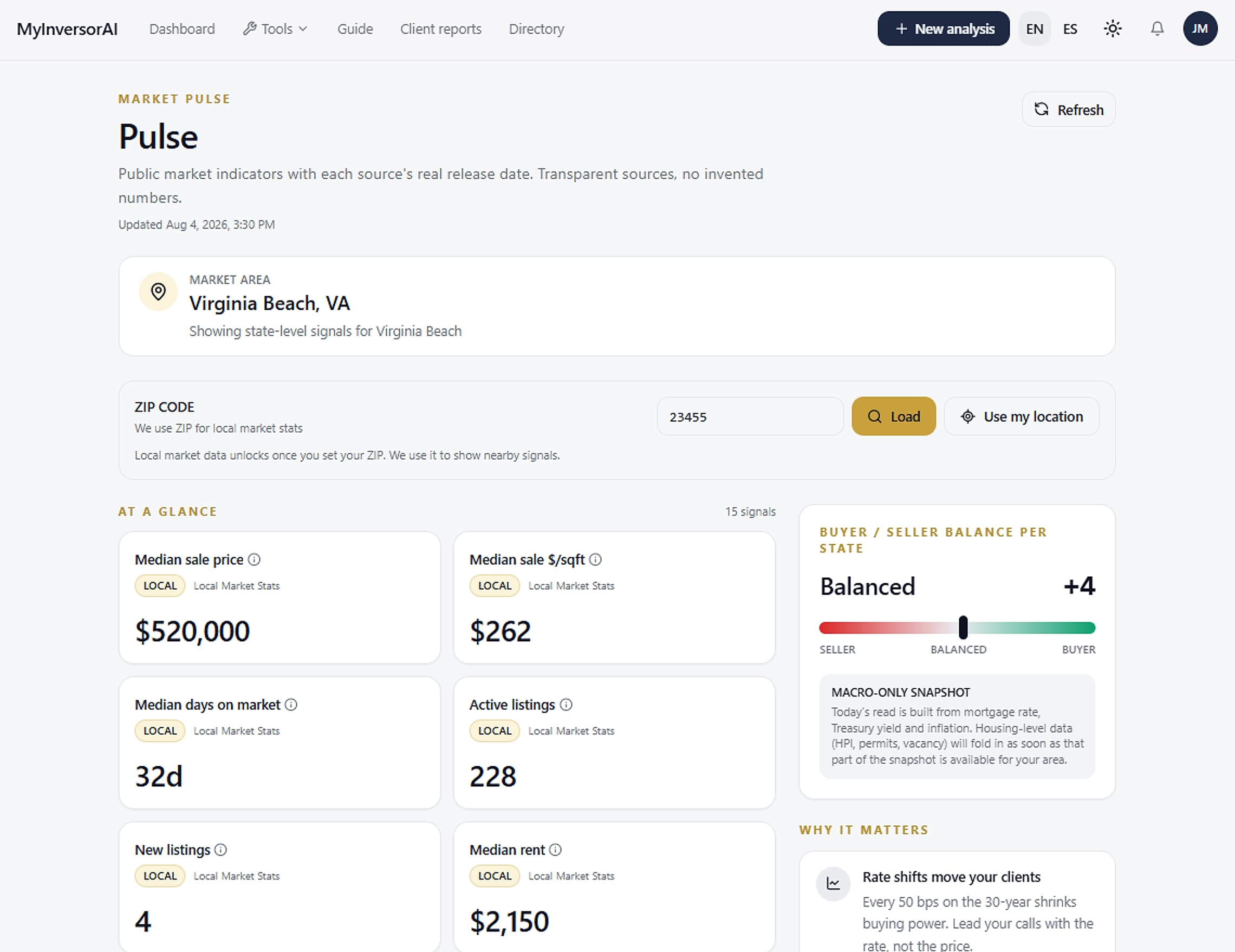
Market context by ZIP or location, with explanations for each metric.

Property surroundings

Natural hazards and nearby places when a compatible source has data. Indicators without information are omitted.

A missing indicator does not mean there is no risk.

Pulse market context for a ZIP code
Pulse and market contextEarlier version · Web · Earlier version; current screens may differ.

Give your capital a plan

Your budget. Your property mix.

Explore what you could buy and build an Investment Kit with properties in the same area, within the capital modeled for down payments, costs and reserves.

  • Adjustable down payment and assumptions
  • Replace, remove or pin properties
  • Projections over different time frames
Available on paid plans

Functions

Budget

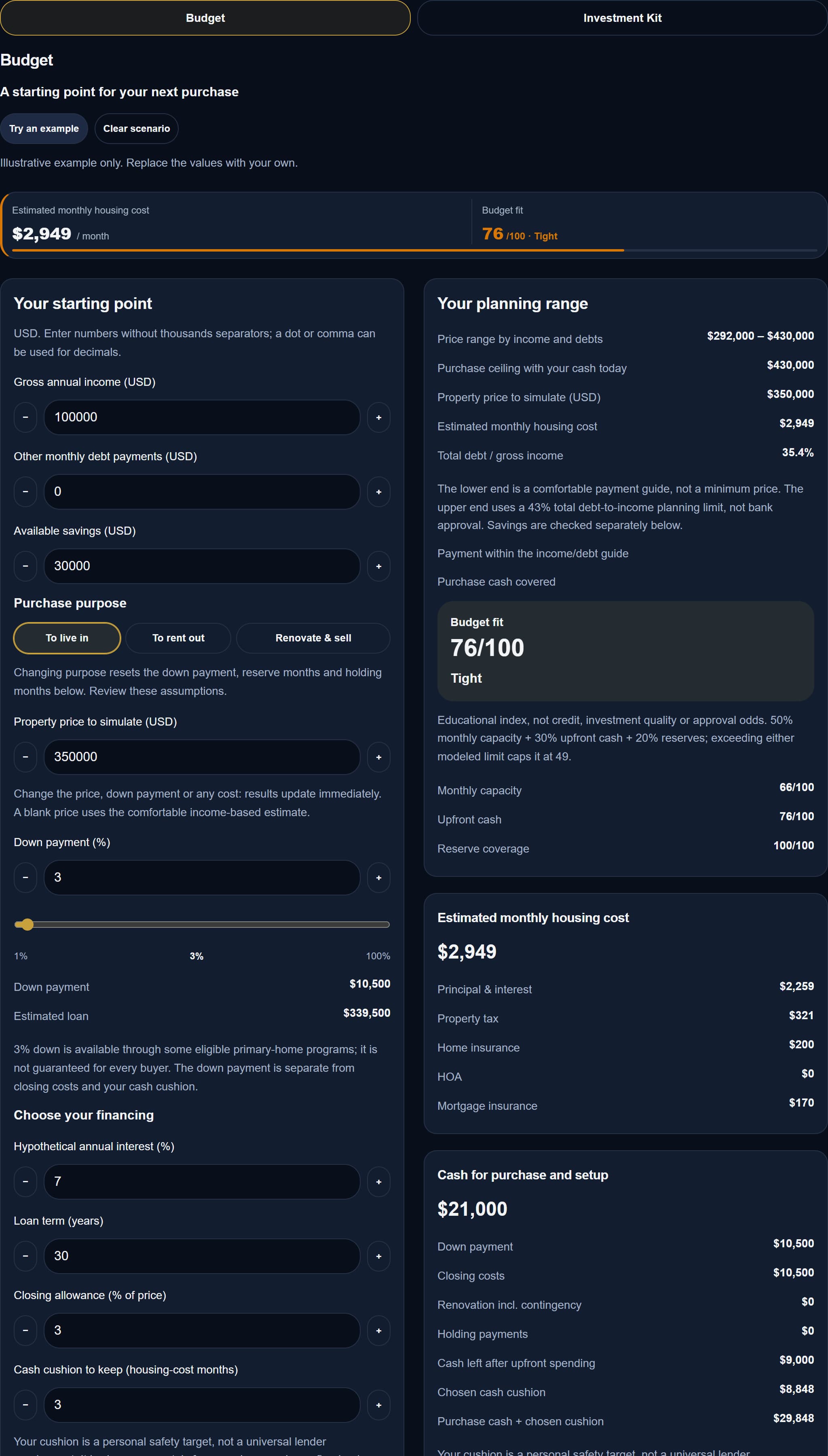
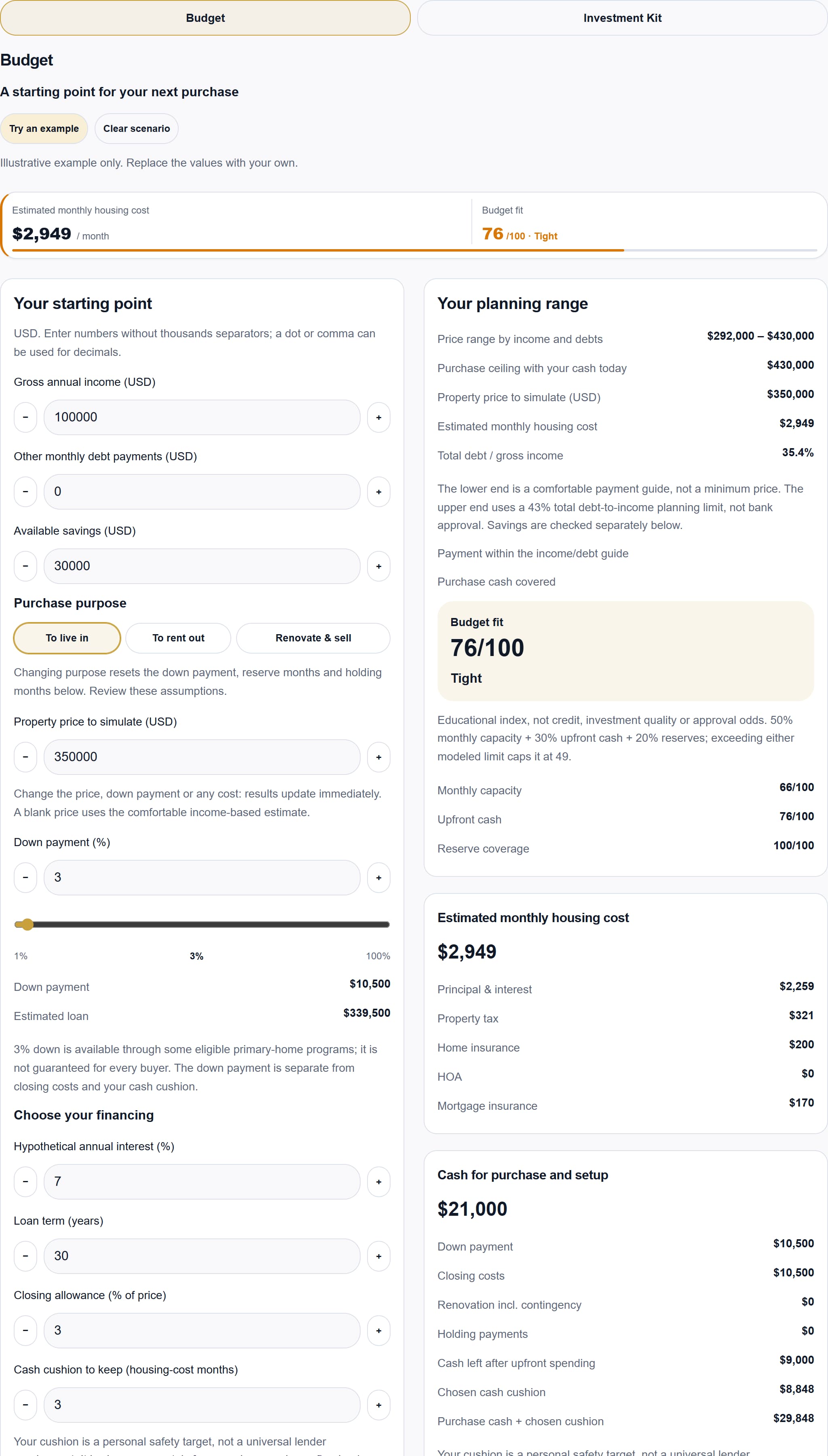
Explore a purchase range, down payment, available cash and optional renovation.

Budget and Investment Kit

Purchase range, renovation and projections. Build a same-region selection within capital for down payments, costs and reserves.

The Kit is a simulator: it does not execute purchases, transactions or pooled investments.

Interactive Budget with purchase range and down paymentInteractive Budget with purchase range and down payment
Interactive BudgetWeb · Product screenshot · Sample data

Connect with opportunities

More context. More conversation.

Post a property, explore opportunities from other members and talk in the private inbox. Analyze each proposal before you take the next step.

  • Posts with filters
  • Private messages and inbox notices
  • Options to report and block
Blackboard and its chats: paid plans

Functions

Blackboard and inbox

Post, filter and discuss opportunities privately. Report, block and manage conversations.

Notification center

Account notices, messages and activity allowed by your plan, with links to the relevant screen.

BlackboardIllustration · Sample data; not real listings, members or messages.

For your visit and your clients

Reports, commissions and Directory

Guide your clients with analyses, scenarios and reports. Use the commission and branding tools your plan includes.

PDF and Directory: every plan · branding and commissions: Realtor plans

Functions

Reports and property visit guide

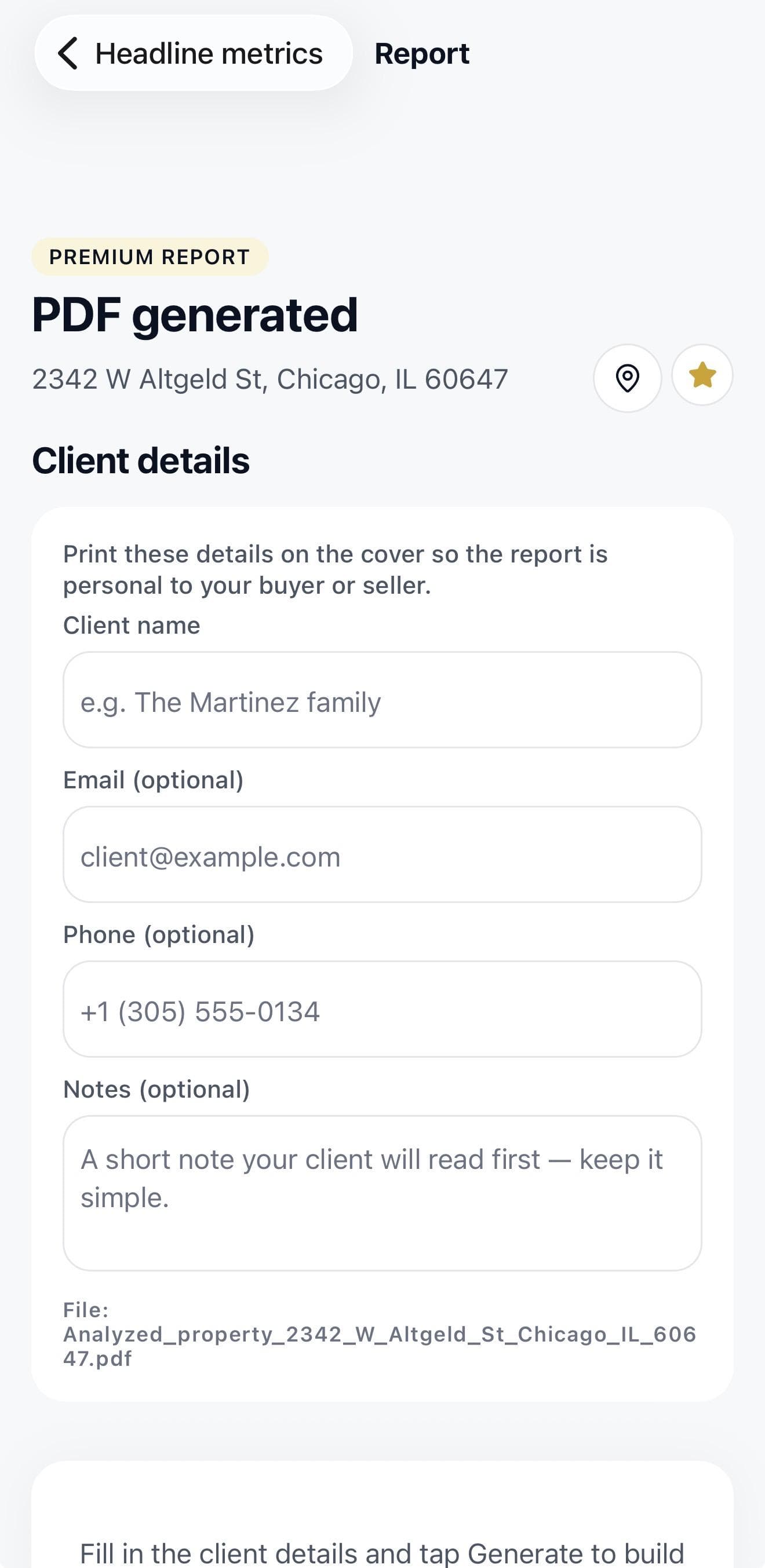
English or Spanish PDFs, a property-specific checklist and ten visit questions. Client reports and branding depend on the plan.

Tools for realtors

Commission calculator, client reports and professional directory profiles with eligible plans.

Realtor directory

Browse approved profiles. Choose when to filter or search near you.

Verified profile

Requires license review and approval, an eligible active subscription and a valid approved profile; placement or leads are not guaranteed.

Client report setup in the mobile app
Client report setupEarlier version · App · Earlier version; current screens may differ.

Features, limits and data availability depend on the plan and the property.

Workflow · A process that makes sense

From an address to a next step.

Get started free
  1. 01 ›

    Bring a property

    Enter an address or start from the listings available in ZipFinder.

  2. 02 ›

    Test the scenario

    Review the inputs and adjust price, down payment, rent and expenses to model your strategy.

  3. 03 ›

    Decide with more context

    Compare, save or prepare the report for your visit and the conversations that follow.

~/myinversorai/workflow/02-scenario

> analyze --address "your address" --strategy rental

  • → property and market data
  • → strategies available for the data
  • → next: 02 · test the scenario

An address or a listing is enough to start.

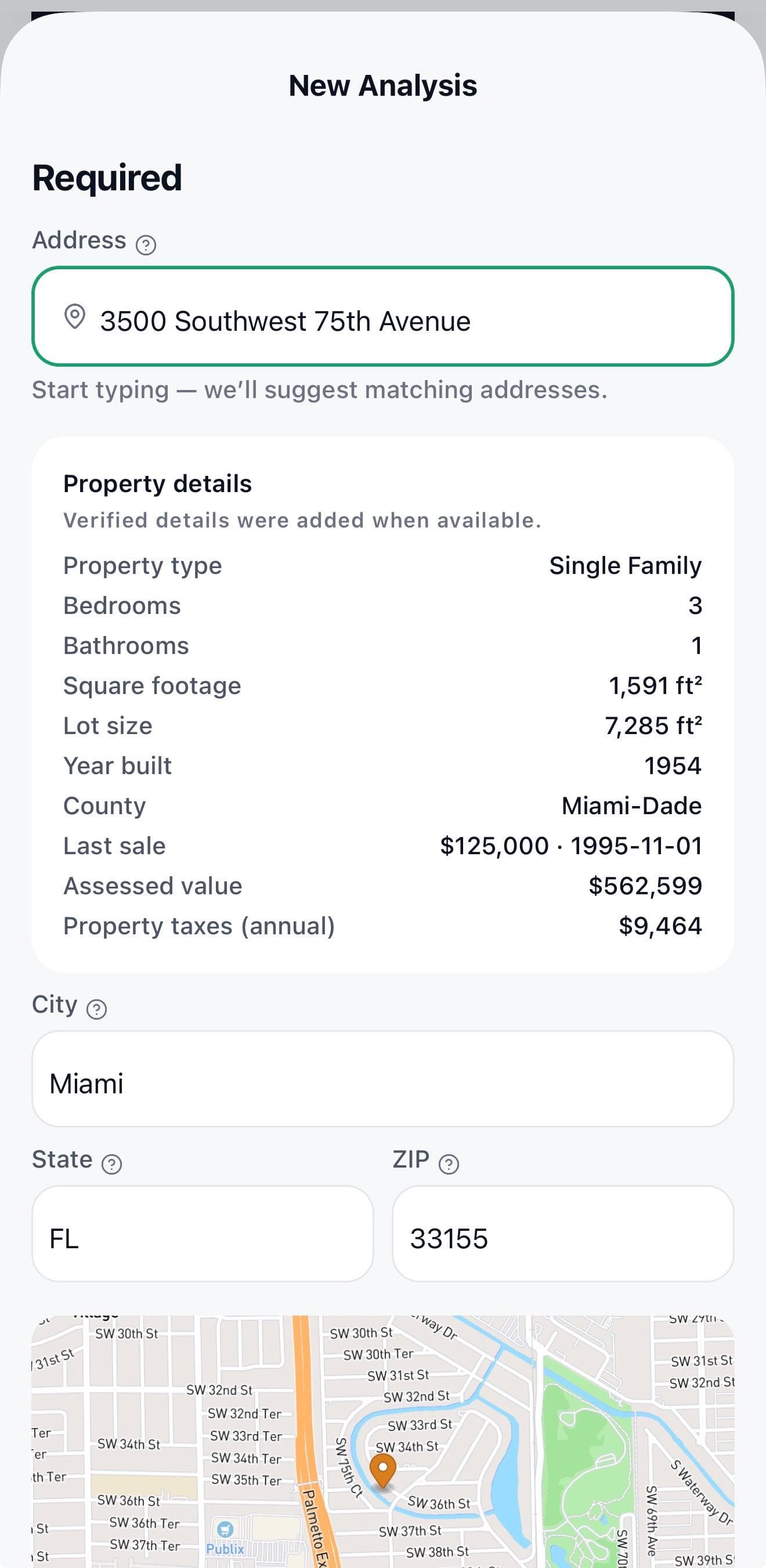
Type the address or start from listings you find in ZipFinder. The platform gathers the available data and shows you the result.

Property entry form in the mobile app
Entering a property · earlier version; current screens may differ. The sample address is not the one in the demo above.

> scenario --sample miami --adjust rent

Move the rent. See what changes.

Inputs from the sample screenshot (Miami, Neutral profile). A simplified simulation in your browser: only the rent and the expenses that depend on it change.

$4,200 a month
cash flow $0 ≈ $4,131
Cash flow · sample data
ItemMonthlyAnnual
Rental income (changes with the rent)$4,200$50,400
Other income$50$600
Mortgage (principal + interest)−$2,067−$24,809
Property tax−$600−$7,200
Insurance−$200−$2,400
HOA−$150−$1,800
Maintenance · 5% of rent (changes with the rent)−$210−$2,520
CapEx reserve · 4% (changes with the rent)−$168−$2,016
Vacancy · 5% (changes with the rent)−$210−$2,520
Property management · 8% (changes with the rent)−$336−$4,032
Utilities−$180−$2,160
Other operating expenses−$75−$900
Net cash flow$54$643
Net cash flow / mo
+$54
Net cash flow / yr
+$643
NOI before reserves
$27,468
NOI after reserves
$25,452
DSCR · debt coverage
1.03 covers the debt

Values from the screenshot at $4,200 · not recalculated here

  • Cap rate (before reserves) 6.46%
  • LTV 75.00%
  • Cash-on-cash return 0.49%
  • GRM 8.4
  • Break-even occupancy 93.72%
  • Expense ratio 47.50%

At $4,200 a month in rent, net cash flow is $54 a month ($643 a year). In this simulation, cash flow reaches $0 at a rent of about $4,131.

Illustrative calculation using the sample’s assumptions: mortgage, property tax, insurance, HOA, utilities and other fixed expenses; maintenance 5%, CapEx reserve 4%, vacancy 5% and management 8% of rent. The platform recalculates every indicator with your data. Not financial advice.

Compare before you decide.

Comparing 3 properties · sample data from the web comparison tool (earlier version)
PropertyStrategyScoreMain metricMore dataAction
Phoenix, AZ1326 N Central Ave, Unit 307Rental · Condo89Best by scoreCash flow $2,758/moCap rate 6.49% · NOI $33,096/yr · LTV 0.00%
Dallas, TX2706 Floyd StRental · Townhouse78Cash flow $1,239/moCap rate 3.12% · NOI $14,864/yr · LTV 0.00%
Austin, TX3018 S 1st St, Apt 112Resale · Condo71Lowest scoreNet profit $13,652Resale ROI 4.77% · ARV $398,750 · LTV 10.00%
Save and compare

Compare up to 2 properties on Free, 5 on Investor Pro and Realtor Plus, and 8 on Realtor Pro.

A PDF for your visit

A checklist tailored to the property type and ten questions, in English or Spanish.

Open the sample PDF

Illustrative sample from an earlier edition. New web reports also include the visit guide.

Plans · Choose your next step

Start exploring. Go deeper when you need to.

Choose your profile to see the compatible options. What each plan includes stays the same.

View:

Swipe to see all four plans, or choose your profile.

MyInversorAI plan comparison
FeatureFree$0 USD/moTo get startedEveryoneInvestor ProFor you$7.99 USD/moTo analyze with more toolsInvestorRealtor PlusFor you$7.99 USD/moTo analyze with more toolsRealtorRealtor ProFor you$12.99 USD/moTo build your professional presenceRealtor
Usage limits
Analyses per day36610
Saved analysesup to 10up to 20up to 20up to 30
Properties compared at onceup to 2up to 5up to 5up to 8
ZipFinder: searches per day13510
ZipFinder: listings per searchup to 6up to 15up to 10up to 15
Features
Analysis of up to five strategiesIncludedIncludedIncludedIncluded

Evaluate up to five strategies, including short-term rentals with your own assumptions, where applicable to the property and available inputs.

Credit, financing, Pulse and surroundingsIncludedIncludedIncludedIncluded

Credit and financing scenarios: Use the credit score and financing assumptions you enter; no credit-bureau check or lending approval.

Pulse and market context: ZIP-level context when data is available, with explanations of the metrics.

Property surroundings: Nearby places and environmental indicators only when a supported source provides data; coverage is not guaranteed.

PDF with a visit guide and Directory browsingIncludedIncludedIncludedIncluded

PDF with a property visit guide: Property-specific checklist and ten questions, in English or Spanish.

Browse the Realtor Directory: Search approved profiles; on mobile, location filtering starts only when you choose Near me.

Risk profiles, matrix and advanced indicatorsNeutral onlyno matrix or advanced indicatorsIncludedIncludedIncluded

Conservative, Neutral and Aggressive scenarios, the strategy matrix and detailed financial metrics. On Free, the Neutral risk profile only; the strategy matrix and advanced indicators require a compatible paid plan.

Budget and Investment KitNot includedIncludedIncludedIncluded

Interactive Budget: Explore an indicative purchase range, down payment, available cash, optional renovation and estimated returns.

Investment Kit: Build and adjust a residential property mix within your modeled budget in the same ZIP; replace, remove or pin properties and simulate returns.

Exact municipal addresses, X-ray and ZipFinder toolsNot includedIncludedIncludedIncluded

Unlocked addresses and property X-ray: Review source-reported foreclosures, official Orange County (FL) tax-deed records and comparable asking-price differences where supported. Municipal permits and cases appear only within the relevant listing or analysis. No record guarantees a sale, discount, clear title or return.

Monday purchase Radar: Follow up to five ZIPs for eligible purchase records and listing-price signals where current sources provide coverage. Free sees counts and masked previews; paid plans unlock exact addresses and alert details. Your notification preferences apply.

ZipFinder filters and sorting: Filter the returned listings by price, days on market, bedrooms or area; sort by score, price, size and more without another search.

Similar properties after an analysis: Up to two same-ZIP/type alternatives near the analyzed price, when available; reuse recent listings and search again only when you choose.

Blackboard and private inboxNot includedIncludedIncludedIncluded

Publish and discover property opportunities, analyze them and contact other members privately; no investment transaction is executed.

Commissions and branded reportsNot includedNot includedIncludedIncluded

Commission calculator: Estimate gross-to-net commission, splits and the agent’s transaction economics.

Client reports and PDF branding: Client-report workflow with the name, company and contact fields enabled for your Realtor plan.

Commissions and client-report branding belong to Realtor plans. Publishing a Directory profile requires Realtor Pro or Team and approval.

Verified Directory profileNot includedNot includedNot includedAfter approval

Requires license review and approval, an eligible active subscription and a valid approved profile; placement or leads are not guaranteed. Browsing the Directory is included on every plan. Publishing your own profile requires Realtor Pro or Team and approval.

Choose a planCreate a free accountChoose planChoose planChoose plan

Web prices in USD. Confirm the amount and terms at checkout; app-store prices may differ. Full pricing, billing and where to buy

Working with a team? Realtor Team pricing is on request. Ask about Realtor Team

Frequently asked questions

Before you take the first step.

10 of 10 questions

Does MyInversorAI tell me which property to buy?

It helps you evaluate scenarios with numbers and context. Scores and projections depend on your assumptions and the available data; they are not a guaranteed purchase recommendation.

What does a free account include?

Analysis with the Neutral profile, the Free plan’s own limits, Pulse context, Directory browsing and a PDF with a visit guide. Budget, the Kit, Blackboard, filters and other advanced tools require a compatible paid plan.

Does the Kit invest in or buy properties for me?

No. It is a simulator to organize a mix of properties and model capital and returns. It does not execute purchases, transactions or pooled investments.

How does my down payment affect my property budget?

You can adjust the down payment, income, savings, debts and costs to explore a purchase range and an estimated monthly payment. The result is a guide: it does not determine your eligibility or replace a lender’s assessment.

Is the Kit’s capital the total price of the properties?

Not necessarily. The limit is the capital available for down payments, costs and reserves. With financing, the combined prices can be higher. You can remove or replace properties in the same region when compatible alternatives exist.

Can I calculate ROI for a rental or a renovation?

You can model income, expenses, financing and the exit for each strategy. ROI, cash flow and the score change with your assumptions; they are not guaranteed returns. The strategies and tools available depend on your plan.

What does the PDF include for a property visit?

Along with the analysis, it includes a checklist tailored to the property type and ten questions to guide your visit. You can create the report in English or Spanish; client-report and branding options depend on your plan.

Are similar properties and area indicators always available?

No. Paid plans can show up to two alternatives with the same ZIP and type, within ±20% of the price, when matching data exists. Area indicators are omitted when there is no information; a missing indicator does not mean there is no risk.

Are the data and estimates guaranteed?

No. Coverage depends on each source and property. Estimates are not appraisals, credit approvals or promises of returns. Review the data and consult the right professionals before you act.

Can I use it in English and Spanish?

Yes. The platform and the reports support both languages.

> analyze --property "your next address"

Your next property deserves a good analysis.

Start by understanding the deal. Then decide your next step.

Get started free

On your desktop. In your pocket.

Your analysis, wherever you need it.

Use it on the web or download MyInversorAI for iOS and Android.

The links open the published apps. Available features may differ between the web and the installed mobile version; mobile updates are released separately.

Illustrative estimates, not financial, legal or lending advice. Screenshots and examples on this page use sample data.